
MEDIREX VERIFY
Secured to the person.
Verified at the scan.
Connect a tamper-evident wristband, a verified photo and current program status — with a simple QR scan.
Register the individual, record an identity check and secure a blue-bordered 4023-BL-BRD wristband to their wrist. Staff scan the QR, compare the displayed photo with the wearer and check current status — without signing in.
Already using Medirex Verify? Staff sign in ↗4023-BL-BRD
ThermaSoft™ · Blue border
ENLARGED PRINT-AREA DETAIL
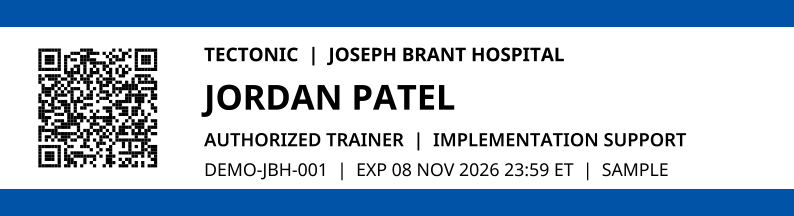 Original credential artwork · Blue preprint
Tamper-evident closure
Must be secured to the individual
CREDENTIAL VERIFICATION

Jordan Patel
Authorized trainer
- Organization
- Tectonic
- Program
- Joseph Brant Hospital
implementation support - Credential status
- Currently active
Match this photo to the wearer. Check that the wristband is secured and intact.

Original 4023 proof layout, shown in blue. Sample only — not valid for access.
FROM REGISTRATION TO VERIFICATION
One connected credential workflow.
The wristband must stay secured to the individual. The QR connects staff to the photo and current record behind it.
Register & confirm
A designated operator registers the individual, checks photo identification and records the identity check.
Print & secure
Capture a photo, set the validity period and print the blue-bordered 4023-BL-BRD wristband. Secure it directly to the individual using its tamper-evident adhesive closure.
Scan & compare
Scan the secured wristband and compare the displayed photo and name with the wearer. An active status alone does not establish that the person presenting it is the credential holder.
See current status
Confirm current credential status and check the wristband for signs of removal or tampering. A loose, removed or damaged band must be referred for re-verification.
THE RECORD BEHIND THE CREDENTIAL
MORE THAN PRINTED INFORMATION
Keep identity attached
to the individual.
A shared QR code or an active credential is not enough to confirm who is presenting it. Combine a wristband secured to the individual, a visual photo comparison and a current status check to help address impersonation and credential sharing.
- Tamper-evident closure: check for signs of removal or transfer.
- Secured to the individual: do not accept a loose wristband.
- Photo comparison: match the displayed face and name to the wearer.
- Current status: check validity and refer mismatches for re-verification.
Credential verification supports your organization’s procedures. Physical access and application permissions remain separate decisions.
DESIGNED AROUND THE PEOPLE USING IT
The right tools for each role.
Registration teams
Check photo identification, capture a matching photo and secure each printed wristband to the correct individual.
Designated operatorsOrganization administrators
Manage your organization’s credential records, validity periods and staff access within the permissions assigned to you.
Organization-scoped toolsStaff checking credentials
Scan the worn wristband, compare the displayed photo with the wearer and confirm current status. Refer photo mismatches or signs of tampering for re-verification.
Account-free QR checksA FEW PRACTICAL QUESTIONS
Simple to check.
Clear to manage.
Start with your registration process, credential format and verification requirements.
Does someone need an account to check a credential?
No. A person with the credential’s QR link can open its verification page without signing in. Registration and administration require an authorized staff account.
Is Medirex Verify a public directory?
No. Verification starts with a specific QR link or full credential code. The portal is configured to ask search engines not to index its pages or results. Anyone with a credential link can view its public verification details.
What happens when a credential changes?
Authorized staff can update its record or revoke it. The verification page retrieves the current status when the QR link is opened; the information printed on the credential itself does not change.
Does an active credential grant hospital access?
No. It confirms the status of the recorded program credential. Staff should still follow their organization’s photo-ID, entry and access procedures.
Why must the wristband be secured to the individual?
A loose wristband or a copied QR code can be presented by someone else. Secure the 4023-BL-BRD wristband to the individual at issuance, inspect its tamper-evident closure and compare the displayed photo with the wearer at each check. Refer any mismatch, damage or evidence of removal for re-verification.
How does the photo help address identity fraud?
The photo gives the checker a visual reference for the person whose credential was issued. Compare it directly with the wearer; do not rely on a name, QR code or active status alone. This is a manual identity check, not automated facial recognition. The photo shown here is an AI-generated example.
How do we plan the printing setup?
Medirex can review the 4023-BL-BRD wristband, printer, workstation and application process with you. Confirm and test the printer configuration and photo-display permissions before rollout.
CONNECT YOUR CREDENTIAL WORKFLOW
Let’s build a clearer
way to verify.
Talk to Medirex about your registration process, physical credentials and the checks your staff need to make.
LET’S TALK ABOUT YOUR CREDENTIAL WORKFLOW
Request a Medirex Verify demonstration.
Complete the form below and mention Medirex Verify in your message so our team can help with your credential verification requirements.
Prefer a separate window? Open the request form ↗